AI Space
AI Space is a local-first personal workspace where the application, its structured data, and Codex work in the same environment. Instead of adding a separate AI chat or model integration to every feature, I can give Codex controlled tools for reading and updating the data that already powers the interface.
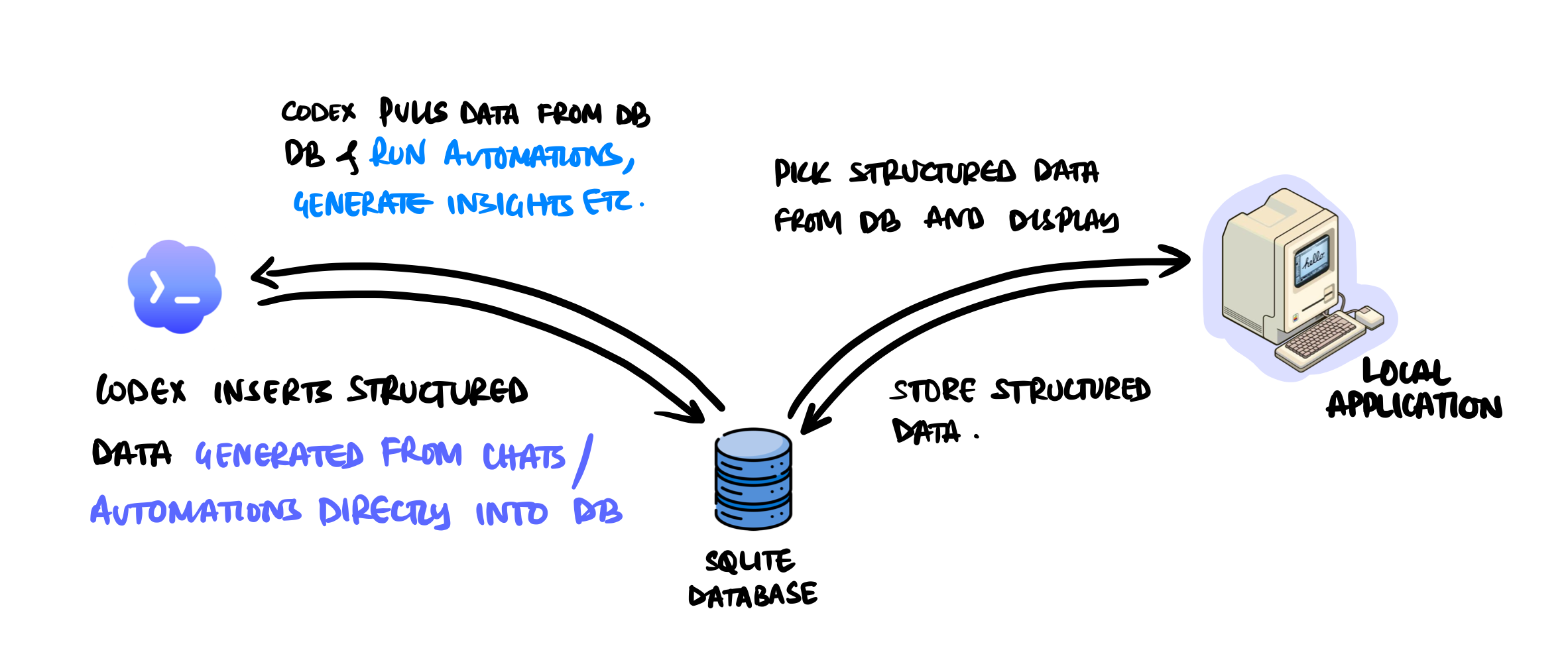
The job application tracker is the clearest example of this idea. It turns a repeated, loosely organized job search into a workflow that Codex can help run while I retain control over what I save, dismiss, or apply to.
The problem with a typical job search
Finding a relevant opening usually involves more than searching for a title. I need to remember which companies I am interested in, visit their career pages, confirm that each role is still open, compare the requirements with my experience, avoid duplicates, and track what I have already reviewed or applied to.
Job alerts can find keywords, but they do not necessarily understand the kind of work I want to do or why a role fits. A one-off AI conversation can help evaluate a posting, but the profile, decision, and result often remain inside that conversation. The next search starts with much of the same work again.
I wanted the workflow to have memory: my preferences should guide every scan, discovered roles should become structured records, and my decisions should survive when those records are refreshed.
The workflow
1. Define the search context
I begin with a Markdown document inside AI Space that describes my target roles, skills, experience, preferred locations, work modes, seniority, roles to exclude, and companies I want to follow. This is not a prompt hidden in the codebase; it is editable application data that I can review and change as my search evolves.
2. Run a manual or scheduled scan
Codex reads the latest context before every scan. It visits the official career source for each selected company and discovers potential openings. The same workflow can be started when I need it or run on a recurring schedule.
The discovery process treats search results only as leads. Before keeping a role, Codex verifies the current official detail page, checks that the description and application action are still available, and confirms that the opening meets the role and seniority criteria in my profile.
3. Evaluate fit with evidence
For every eligible opening, Codex compares the role with my skills, experience, target domain, and location preferences. It produces a fit score, a short explanation, the skills that match, and the gaps that may need attention. Facts such as salary, posting date, or work arrangement are recorded only when the source actually provides them.
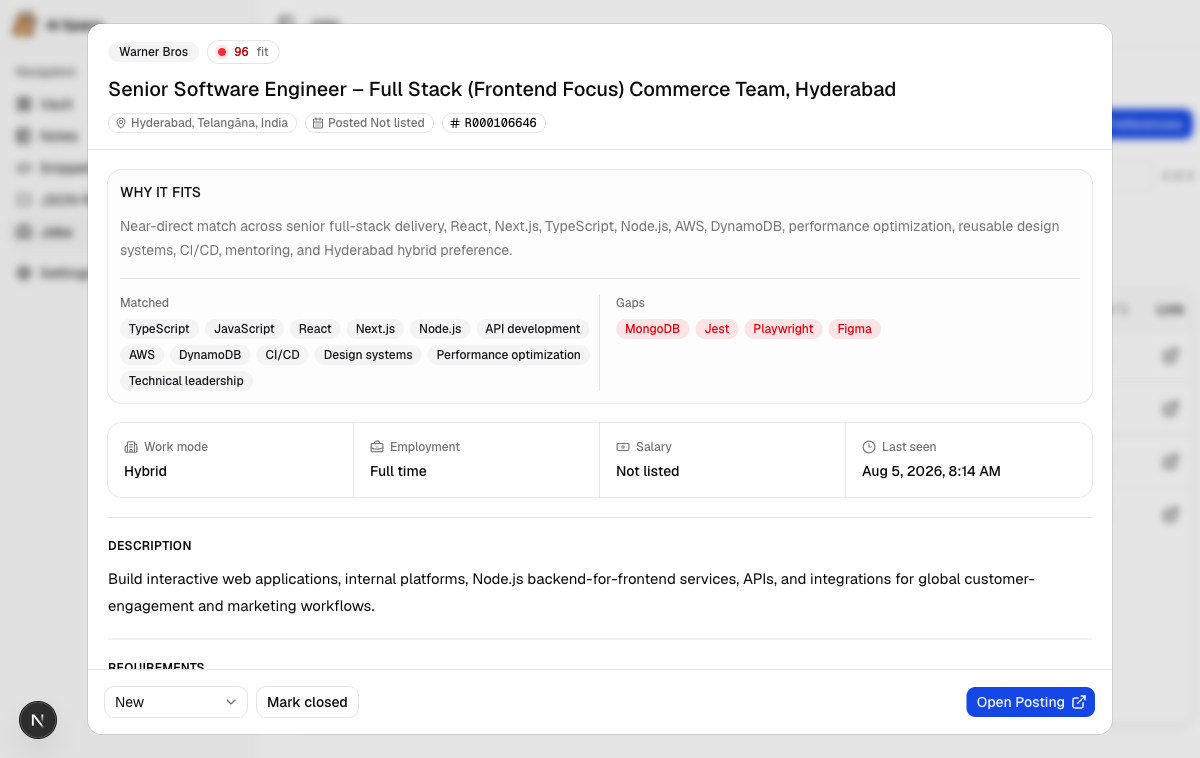
The score is a triage tool rather than an application decision. The detail view keeps the reasoning visible so I can judge the role for myself instead of relying on a number alone.
4. Save a structured discovery run
The complete scan is validated and written to the local SQLite database as one transaction. New openings are created, known openings are updated, and duplicates are resolved using a stable source identity.
The ingestion step also preserves my workflow status. A role I marked as saved, applied, or dismissed does not return to the beginning just because a later scan refreshed its description. If an opening disappears from three successful company scans, it is marked closed rather than being removed immediately. Failed or blocked company scans are recorded honestly and do not close previously discovered roles.
5. Review and act in the application
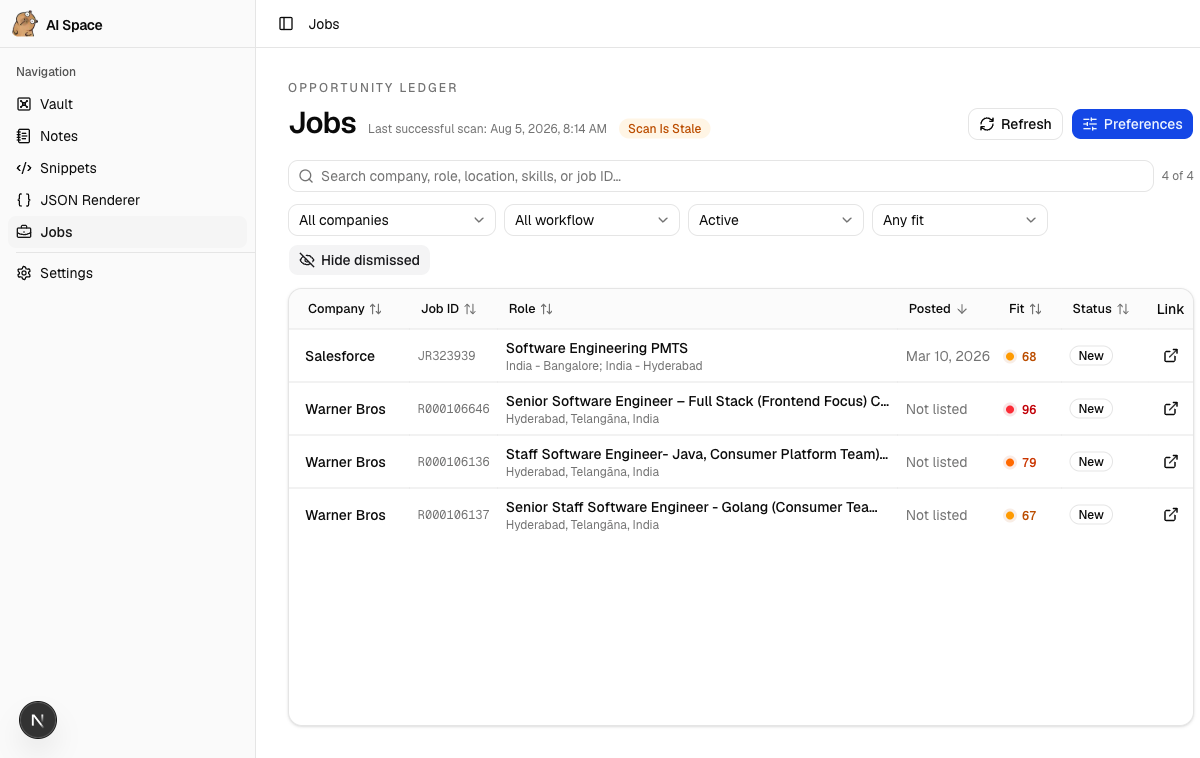
The Jobs page is the human side of the workflow. I can search by company, role, location, skill, or job ID; filter by fit, availability, and workflow status; inspect the full description and requirements; and mark an opening as new, saved, applied, or dismissed.
AI Space does not submit applications, sign in to external systems, or contact anyone on my behalf. Codex handles the repetitive discovery and comparison work, while the consequential decisions remain with me.
Why this belongs in AI Space
The tracker could have been built as a conventional application with a fixed integration for job search and AI scoring. In AI Space, the interface and database provide the durable foundation, while Codex acts as the reasoning and automation harness around them.
That separation matters. The application owns structured records, validation, filters, and workflow state. The Codex skill owns the instructions for research, eligibility, evidence, and ingestion. I can refine the workflow without redesigning the interface for every new idea, and I can inspect both the instructions and the resulting data locally.
| Layer | Responsibility |
|---|---|
| Job preferences | Stores the profile, search criteria, and companies to follow |
| Codex workflow | Discovers, verifies, filters, and evaluates current openings |
| Ingestion script | Validates a complete scan, deduplicates records, and preserves user state |
| SQLite database | Stores job postings, discovery history, fit evidence, and workflow status |
| Jobs interface | Supports search, filtering, detailed review, and application tracking |
The broader idea
The job tracker is one feature, but it demonstrates the larger direction of AI Space. When an application has a reliable data model and Codex has controlled ways to work with it, an AI-assisted workflow does not have to end as text in a chat. It can become persistent, reviewable application state.
The same pattern can support other personal workflows, but the value is easier to see through a real example: define the context once, let Codex perform the repeatable reasoning, keep the result in a useful interface, and leave important decisions with the user.
Technology
AI Space is built with Next.js, React, TypeScript, shadcn/ui, and Tailwind CSS. Drizzle ORM provides typed access to the local SQLite database. The job discovery workflow is implemented as a project skill with explicit research and safety instructions, plus a transactional ingestion script that protects the integrity of the local data.
What I learned
The useful part of AI in this workflow is not a chat box. It is the connection between clear instructions, live research, persistent structured data, and a focused interface for review.
The job tracker also reinforced the importance of keeping judgment visible. Fit scores are more useful when they include evidence, automations are safer when failures are recorded rather than hidden, and a local-first system remains trustworthy when user decisions are preserved across every run.
Thank you for reading. Please feel free to reach out if you would like to connect or discuss AI Space.